
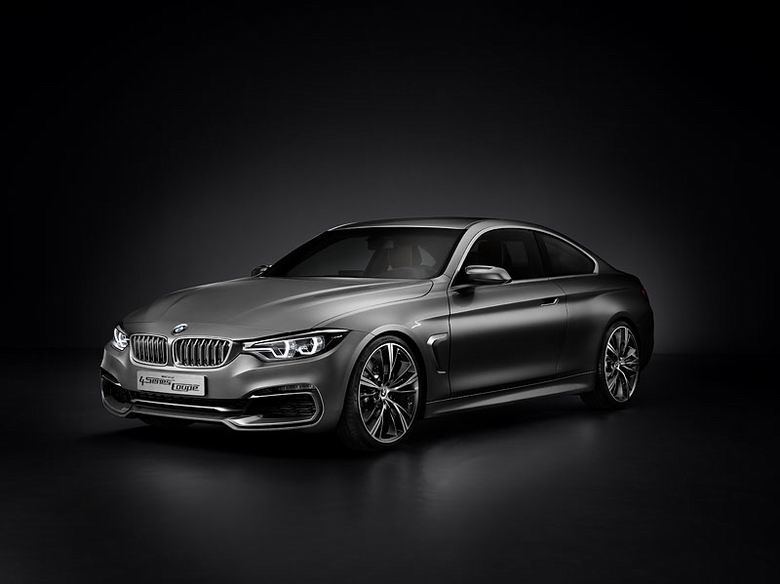
The future for BMW starts here. New car, new name, potentially a new benchmark. The images of the 4-series Concept that have been released today are a hint that BMW is taking this new generation of their hottest selling coupe very seriously. Design-wise the similarities with its sedan counterpart, the all-new 3-series that we have already driven this year, end at the front end – the 4-series boasting a far more aggressive, sleeker, much wider and obviously sportier design. Despite this being a concept, the 4-series is almost production ready, you can expect some toning down of the complex front and rear bumpers, but aside from that, this is pretty much what will be hitting the floor at your local dealer in 2013. And with anticipation for its release comes obvious anticipation for the range topper, the M3 – no wait, the M4! Confusing stuff this name changing malarkey. But badges aside, we all know the M-version of the “4″ could potentially pave the way for a new generation of sports cars in this segment. BMW
要检查您的网络连接,请单击工具菜单,然后单击 Internet 选项。在连接选项卡上,单击设置。 设置必须与您的局域网(LAN)管理员或 Internet 服务供应商(ISP)提供的一致。
查看您的 Internet 连接设置是否正确被检测。您可能设置让 Microsoft Windows 检查您的网站并自动发现网络连接设置(如果您的网络管理员已经启用此设置)。
单击工具菜单,然后单击 Internet 选项。
在连接选项卡上,单击 LAN 设置。
选择自动检测设置,然后单击确定。
某些站点要求 128 位连接安全。单击帮助菜单,然后单击关于 Internet Explorer 可以查看您所安装的安全强度。
如果您要访问某安全站点,请确保您的安全设置能够支持。请单击工具菜单,然后单击 Internet 选项。在“高级”选项卡上,滚动到“安全”部分,复选 SSL 2.0、SSL 3.0、TLS 1.0、PCT 1.0 设置。
单击上一步按钮,尝试其他链接 作者: 常凯申 时间: 2012-12-7 11:13